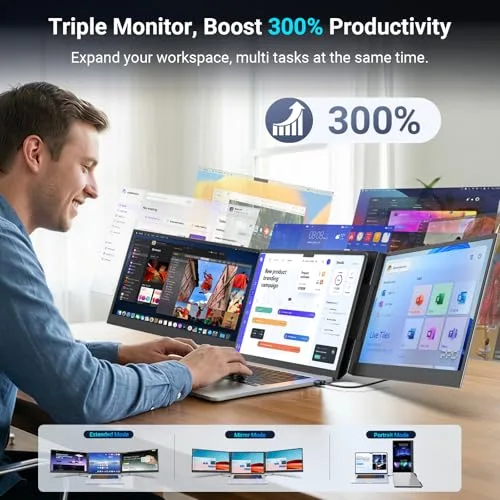
ZUMWALT panels clip onto your laptop and add a second or third FHD screen in minutes — plug-and-play over USB-C, no driver, and light enough to fold into a bag between the office and the road.
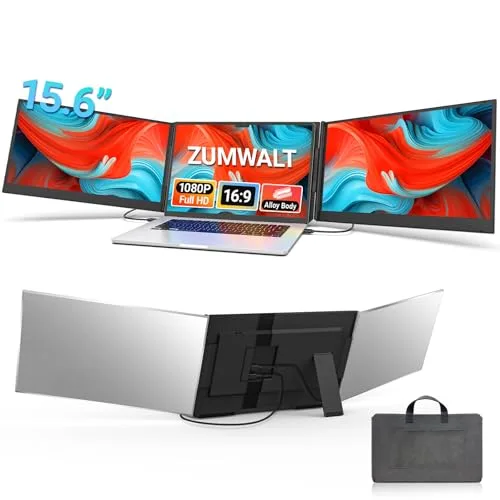
ZUMWALT builds laptop screen extenders for people who need more workspace than one display can give them without carrying a full second monitor. The P7 clips straight onto a laptop lid and adds two 15.6" panels for a genuine triple-screen setup, connected with as little as two USB-C cables and no driver install. The 15.6" detachable model and the 16.1" 1200P monitor take a different approach — a stand-mounted panel you can angle or rotate 360° independently rather than a fixed hinge — while the S8 trades some screen size for the lightest build in the lineup at 1.32 lbs. Two small connection cables round out the range: the HDMI-to-USB-C cable for laptops with an HDMI port instead of full-featured Type-C, and the H5-T adapter cable, ZUMWALT's documented fix for USB-A-only laptops and M1/M2/M3/M4 MacBooks that don't output video over every Type-C port.
Real Specs, Not Just Marketing Copy
Pulled straight from ZUMWALT's own listings.
01
Instant Multi-Screen Setup
Clip a panel onto your laptop and go from one screen to a dual or triple-screen workspace in a couple of minutes.
02
Plug & Play, No Driver
The P7, 15.6" detachable, 16.1" and S8 all connect over USB-C with zero software to install — only the H5-T adapter cable needs a one-time driver.
03
As Light as 1.32 lbs
The S8 is the lightest panel in the lineup; the P7 tops out at about 4 lbs for a full triple-screen kit.
04
Built to Travel
Every model folds flat and packs into its own carry sleeve or bag rather than needing a separate case.
05
Extend, Mirror or Rotate
Switch between Extend, Mirror and Portrait modes depending on the model, with up to 360° rotating stands.
06
A Cable for Every Port Type
Full-featured USB-C, USB-C + HDMI, or the H5-T adapter for USB-A-only laptops and M1/M2/M3/M4 MacBooks — there's a documented connection path for each.
The ZUMWALT Lineup
Four screen extender panels and two connection cables — pick the panel that matches your laptop, and the cable that matches your ports.
Portable Screen Extenders
The panels themselves — pick by screen size, weight and how you want to mount it.
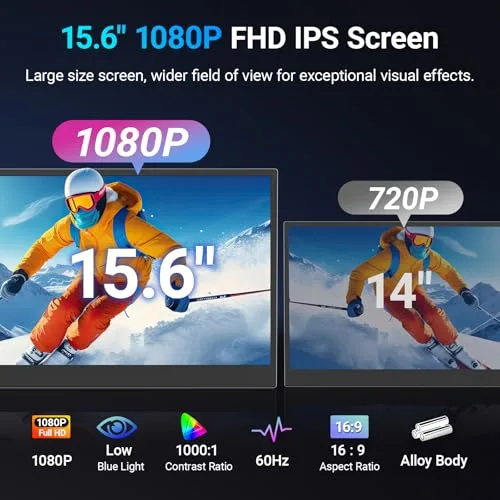
The P7 is ZUMWALT's flagship screen extender: two 15.6" 1080P IPS panels that clip onto your laptop lid and turn a single screen into a triple-monitor setup in a couple of minutes. When your laptop has two full-featured USB-C ports, it connects with just two USB-C-to-USB-C cables — no external power brick, no driver install. An aluminum-alloy shell keeps the roughly 4 lb (1.8 kg) unit stiff enough for daily folding without flexing, and it mounts without a top clamp or baffle, so it isn't putting sideways pressure on your laptop's hinge. Each panel runs 280 nits of brightness across a 178° viewing angle, and the kit folds into an included carry sleeve for travel.
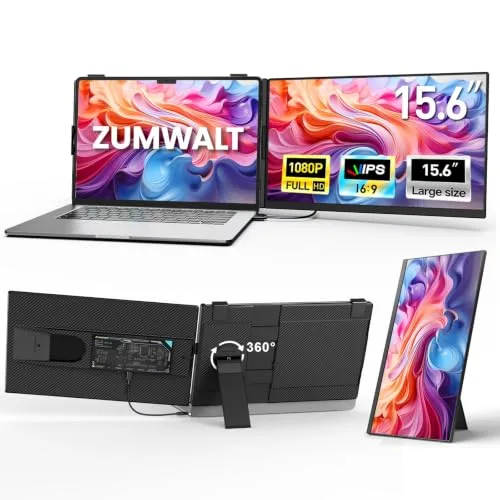
This model swaps the P7's fixed hinge for a fully detachable 15.6" panel on a 360° rotating stand, so you can pull the screen off the mount entirely and angle it independently in landscape or portrait. At just 5mm thick and 2.75 lbs total (1.45 lbs once split apart), it's built around a foldable 180° hinge with a built-in kickstand and non-slip base rather than clipping directly to a laptop lid. Brightness, contrast and built-in stereo speakers can all be adjusted on the panel itself, and a blue-light filter is built in for longer editing or gaming sessions. Connects over USB-C with no driver required.
The Largest Panel in the Lineup, 16:10 Aspect Ratio
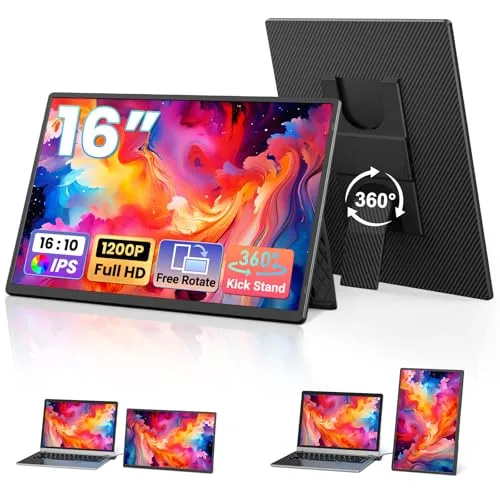
The biggest screen ZUMWALT makes: a 16.1" 1920x1200 IPS panel at a 16:10 aspect ratio, which works out to about 20% more vertical workspace than a standard 14" widescreen extender — noticeably more room for a spreadsheet or a tall document. A detachable magnetic stand rotates a full 360° between landscape and portrait, and at 1.48 lbs with a 0.31" profile it's the thinnest single panel in the range. A single full-featured USB-C cable carries both video and power for a one-cable setup, with an HDMI cable included as a fallback for laptops that need it. A PU-leather cover doubles as a mousepad when you're using the panel on the road.
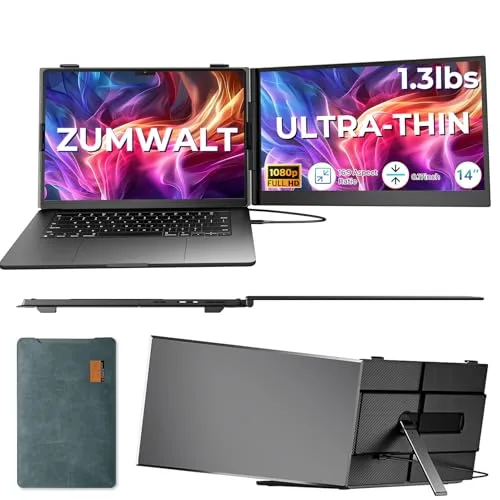
The S8 trades a bit of screen size for the lightest build in the lineup — a single 14" 1080P IPS panel at just 1.32 lbs, aimed at people who want a dual-screen setup without adding much to a bag. It folds to a 180° viewing angle, includes stereo speakers and independent brightness/contrast controls, and ships with a USB-C-to-USB-C cable, an HDMI-to-Type-C cable, a USB-A-to-USB-C cable and a carry bag so most laptop port combinations are covered out of the box. One real limitation to know before buying: ZUMWALT states the S8 is not compatible with M1/M2/M3 MacBook chips, unlike the rest of the lineup which can reach those laptops through the separate H5-T adapter cable.
Cables for laptops whose ports don't match a panel's default USB-C setup.
Connection Accessory
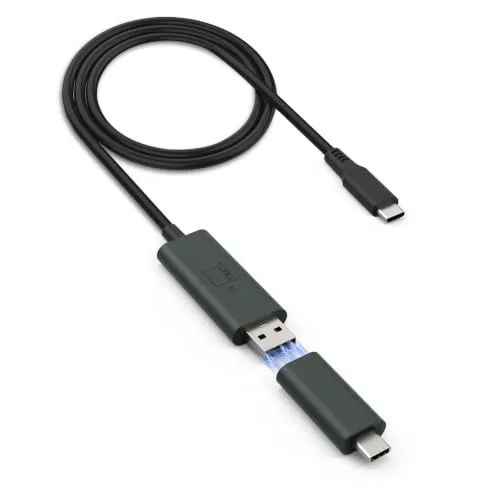
ZUMWALT H5-T Cable
The Fix for "No Signal" on M1/M2/M3 MacBooks and USB-A-Only Laptops
A 2-in-1 USB-A/USB-C adapter cable built specifically to solve the most common ZUMWALT setup problem: a laptop without a full-featured video-capable USB-C port. It converts a standard USB-A port or a non-video USB-C port into a working video output, and is the officially listed fix for connecting a ZUMWALT extender to M1, M2, M3 and M4 MacBooks, which don't expose external video over every Type-C port. It needs a one-time driver install (the "USB Display" driver) on both Windows and macOS before video output starts working.
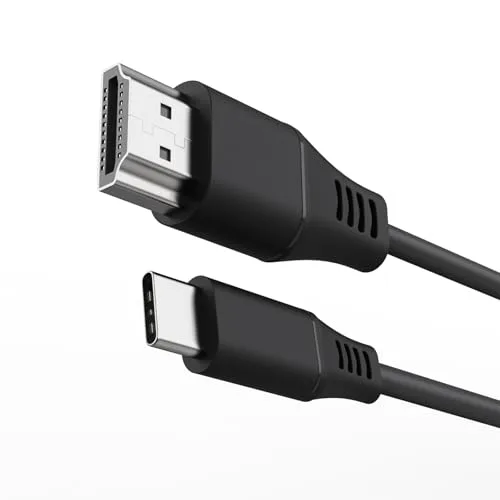
A straightforward 3.3ft HDMI-to-USB-C cable for the other common gap: a laptop with an HDMI port but no full-featured Type-C video output. It carries a 1080P signal from the HDMI port into a ZUMWALT extender panel's USB-C input, needs no driver, and uses an aluminum-shell connector built for repeated packing and unpacking rather than a thin single-use cable.
The engineering behind ZUMWALT's flagship triple-screen extender.
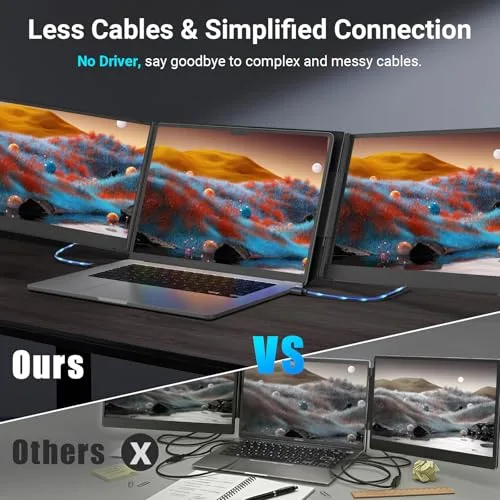
Fewer Cables, Simpler Connections
Most panel connections come down to two USB-C-to-USB-C cables when a laptop's ports support it — a plainer setup than extenders that need a separate power brick and multiple adapters for the same result.
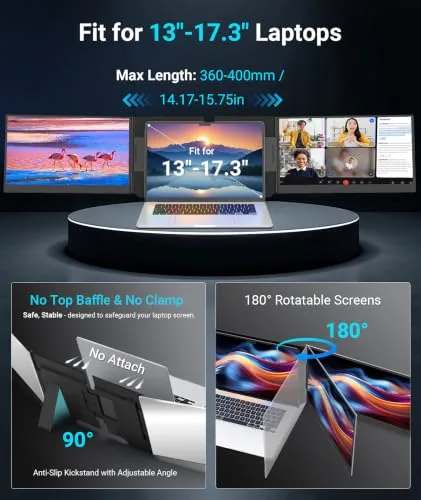
Fits 13"-17.3" Laptops, 180° Rotation
A kickstand and hinge system built for laptops from 13 up to 17.3 inches, with panels that rotate up to 180° and a no-clamp, no-top-baffle mount designed to avoid stressing the laptop hinge.
Triple-Screen Multitasking
Extend, mirror or switch to portrait mode across up to three panels at once, so spreadsheets, chat, and a document can each get their own screen instead of constant tab-switching.
Ultra-Slim and Travel-Ready
The P7's aluminum-shell panels run about 4 lbs together and pack into the included carry sleeve, built to survive being carried through an airport rather than just a desk.
Installation Guide
How to connect a ZUMWALT panel to your specific laptop's ports.
Setup Steps
Unfold the panel and set the stand
Unbox the extender and unfold the panel(s) flat. On the P7 and S8, the hinge clips onto the top of your laptop lid without a top clamp or baffle; on the detachable 15.6" and 16.1" models, attach the included magnetic or kickstand base and set it to a stable angle.
Check which USB-C ports your laptop has
Look for the full-featured Type-C symbol (a lightning bolt or SS/D icon) next to your laptop's USB-C ports — a port without it can charge a device but won't carry a video signal. This determines which of the next two connection methods to use.
Connect with two USB-C cables, if your laptop supports it
If your laptop has two full-featured Type-C ports, connect two USB-C-to-USB-C cables — one to each — for video and power in one step, no driver needed.
Or connect with USB-C + HDMI, if it only has one
If your laptop has one full-featured Type-C port plus an HDMI port, run a USB-C cable to the first panel and the included HDMI-to-Type-C cable to the second, then connect a USB-A-to-USB-C cable to the HDMI side for extra power if the screen looks dim.
Or connect through the H5-T cable, if neither applies
If your laptop has no full-featured Type-C port at all — common on M1/M2/M3/M4 MacBooks and on USB-A-only laptops — connect through the H5-T adapter cable instead. Install its "USB Display" driver the first time (Windows: run the driver file; Mac: move the app to Applications and enable it under Privacy & Security) before video appears.
Power the panel if the screen looks dim
If brightness looks low after connecting, plug the included power adapter into the panel's dedicated power port — this pulls power directly from an outlet instead of your laptop's battery.
Choose Extend, Mirror or Portrait mode
Open your OS's display settings (Windows: Display Settings; macOS: Displays) to choose Extend (separate workspace per screen), Mirror (duplicate your main screen) or rotate the panel and set it to Portrait for reading or coding.
Fold flat and pack for travel
Fold the panel(s) back against the stand or laptop lid and slide the whole setup into the included carry sleeve or bag before packing it.
Troubleshooting
Screen shows "No Signal"
Re-check your cable combination against step 3-5 above — this is almost always a mismatch between your laptop's actual port type and the connection method being used, not a defective unit.
M1/M2/M3/M4 MacBook not detecting the panel
Apple restricts video output on some Type-C ports on these chips even when the port charges normally. Use the H5-T adapter cable and install its driver rather than a direct USB-C connection (note: the S8 model is not compatible with these chips even with the H5-T cable).
Picture is dim or flickering
Connect the included power adapter to the panel directly — running purely off a laptop's USB-C power delivery is sometimes not enough for full brightness, especially with two panels connected at once.
What ZUMWALT Customers Are Saying
Amazon's own AI-generated review summaries — individual review text is sign-in-gated, so this is the real aggregate rather than invented quotes.
P7 / Detachable 15.6" / 16.1" — Shared Rating Pool
★★★★☆
4.4★ average · 281 ratings · Amazon's AI-generated review summary
Customers find the screen extender to be a high-quality panel that's easy to set up and use, with clear 1080p picture quality and plug-and-play USB-C connectivity. They appreciate its portability for work and travel, the lightweight build, and consider it well worth the money — several highlight how much easier multitasking becomes once multiple windows are spread across the extra screens.
Quality (60)Portability (57)Easy to set up (49)Image quality (36)Lightweight (23)Value for money (22)Connectivity (21)Multitasking (19)
5★
77%
4★
8%
3★
6%
2★
3%
1★
6%
S8 14" — Own Rating Pool
★★★★☆
4.3★ average · 40 ratings · Amazon's AI-generated review summary
The S8's own review breakdown skews heavily toward 5-star ratings, with buyers most often calling out how light it is to carry and how quick the plug-and-play setup is compared to extenders that need a driver install.
5★
72%
4★
11%
3★
6%
2★
0%
1★
11%
The P7, 15.6" detachable and 16.1" monitor (US) share one review pool (4.4★/281) because they're listed as variants of the same parent listing on Amazon — not three independently-earned scores. The S8 carries its own separate, smaller rating.
Frequently Asked Questions
Not for most setups. The P7, the 15.6" detachable model and the 16.1" monitor are all plug-and-play over USB-C — connect the cable and the extra screen shows up automatically. The one exception is the H5-T adapter cable, used for USB-A ports or non-video USB-C ports, which needs a one-time "USB Display" driver installed on Windows or macOS before video output works.
It depends on your MacBook's port, not just the chip. If your Mac has a full-featured Type-C port that outputs video, a ZUMWALT extender connects directly. If it doesn't, you'll need the H5-T cable, which is ZUMWALT's listed fix specifically for M1/M2/M3/M4 MacBooks without a video-capable Type-C port. The S8 model is the one exception — ZUMWALT states it isn't compatible with M1/M2/M3 chips even with the H5-T cable, so the P7, detachable 15.6" or 16.1" monitor are the better pick for those Macs.
The P7 clips onto your laptop lid with a fixed hinge and runs two 15.6" panels for a true triple-screen setup. The 15.6" detachable model instead uses a stand you can pull the panel off of and rotate 360°, which suits someone who wants one flexible screen rather than a locked triple-monitor rig. The 16.1" monitor is the largest single panel in the lineup, at a taller 16:10 aspect ratio with about 20% more vertical space than a standard 14" extender, and it's also the thinnest and lightest of the three.
Up to two extra panels with the P7 (for a triple-screen total including your laptop's own display). The other models are single extra panels, giving you a dual-screen setup. All of them support Extend, Mirror and Portrait modes, so you can choose to expand your workspace, duplicate your screen for a presentation, or rotate to portrait for reading code or long documents.
The listings note compatibility with Switch specifically, alongside Windows, Mac, Chrome OS and Android DeX laptops and tablets. Support for other consoles like PS5 isn't listed by ZUMWALT for every model, so check the specific product page for your device before buying if you're not connecting a laptop.
It varies slightly by model, but a typical kit (the S8, for example) includes the monitor panel(s), a USB-C-to-USB-C cable, an HDMI-to-Type-C cable, a USB-A-to-USB-C cable and a carry bag. The P7 and 16.1" monitor also include a magnetic or foldable stand and, on some models, a power adapter for extra brightness. Check the "What's in the Box" section on each product's own listing for the exact contents.
This almost always means the connection path doesn't match your laptop's ports. If you're using two USB-C cables, confirm both laptop ports are full-featured (support video, not just charging). If your laptop only has one video-capable port, switch to the USB-C + HDMI cable combo instead. If your laptop has no full-featured Type-C port at all, you'll need the H5-T adapter cable with its driver installed rather than a direct USB-C connection.
Not always — most setups run on power drawn through the connection cables themselves. If a panel looks dimmer than expected or won't turn on, connecting the included 5V/3A power adapter (where included) to the panel's power port restores full brightness without relying on your laptop to supply it.
The H5-T is a 2-in-1 USB-A/USB-C adapter that converts a standard USB-A port or a non-video-capable USB-C port into a working video output. You only need it if your laptop lacks a full-featured Type-C port — most commonly on M1/M2/M3/M4 MacBooks or older Windows laptops with USB-A-only ports. If your laptop already has two full-featured USB-C ports, or one Type-C port plus HDMI, you won't need it.
ZUMWALT lists a 12-month warranty on its laptop screen extenders. For setup help or a warranty issue, ZUMWALT's listings point buyers to contact the seller directly through Amazon, with a stated response window of about 24 hours.